Note
Go to the end to download the full example code.
AirNow Data#
This example shows the different ways to pull air quality information from EPA’s AirNow API for an area near the ARM Southern Great Plains (SGP) atmospheric observatory.
<xarray.Dataset> Size: 16B
Dimensions:          (index: 1)
Coordinates:
  * index            (index) int64 8B 0
Data variables:
    WebServiceError  (index) object 8B 'Error - There is no reporting area at...
<xarray.Dataset> Size: 1kB
Dimensions:               (index: 19)
Coordinates:
  * index                 (index) int64 152B 0 1 2 3 4 5 6 ... 13 14 15 16 17 18
Data variables:
    DateObserved          (index) object 152B '2025-05-01' ... '2025-05-01'
    StateCode             (index) object 152B 'OK' 'OK' 'OK' ... 'OK' 'OK' 'OK'
    ReportingAreaName     (index) object 152B 'Miami' 'Miami' ... 'McAlester'
    ParameterName         (index) object 152B 'PM2.5' 'OZONE' ... 'PM10' 'OZONE'
    DailyAQI              (index) int64 152B 32 38 23 9 90 32 ... 7 51 24 10 49
    DailyAQICategoryName  (index) object 152B 'Good' 'Good' ... 'Good' 'Good'
<xarray.Dataset> Size: 112B
Dimensions:             (index: 1)
Coordinates:
  * index               (index) int64 8B 0
Data variables: (12/13)
    DateObserved        (index) object 8B '2026-10-15'
    HourObserved        (index) object 8B '13:00'
    LocalTimeZone       (index) object 8B 'CDT'
    ReportingAreaName   (index) float64 8B nan
    SiteID              (index) int64 8B 400710604
    SiteName            (index) object 8B 'Ponca City'
    ...                  ...
    NowcastAQI          (index) int64 8B 8
    AqiCategoryName     (index) object 8B 'Good'
    ReportingAgency     (index) object 8B 'Oklahoma Department of Environment...
    LookupBehavior      (index) object 8B 'Closest Reading By Pollutant'
    ConsideredMonitors  (index) object 8B 'All'
    LookupBoundary      (index) object 8B '50 Miles'
<xarray.Dataset> Size: 584B
Dimensions:            (time: 13)
Coordinates:
  * time               (time) datetime64[us] 104B 2022-05-01 ... 2022-05-01T1...
    sites              <U10 40B 'Ponca City'
Data variables:
    latitude           float64 8B 36.7
    longitude          float64 8B -97.08
    aqs_id             int64 8B 400710604
    PM2.5              (time) float64 104B 4.3 5.3 5.9 6.9 ... 7.7 7.4 7.6 7.8
    AQI                (time) float64 104B 24.0 29.0 33.0 ... 41.0 42.0 43.0
    category           (time) float64 104B 1.0 1.0 1.0 1.0 ... 1.0 1.0 1.0 1.0
    raw_concentration  (time) float64 104B 5.1 6.3 6.5 7.9 ... 7.1 7.1 7.8 8.1
/home/runner/work/ACT/ACT/act/plotting/plot.py:81: UserWarning: Could not discern datastreamname and dict or tuple were not provided. Using defaultname of act_datastream!
  warnings.warn(
import os
from datetime import datetime

import matplotlib.pyplot as plt

import act

# You need an account and token from https://docs.airnowapi.org/ first.
token = os.getenv('AIRNOW_API')

if token is not None and len(token) > 0:
    # Get current forecast values for reporting areas within 100 miles of
    # the ZIP code. A latitude/longitude location can also be used instead:
    #
    # results = act.discovery.get_airnow_forecast(
    #     token, date, distance=100, latlon=[41.958, -88.12]
    # )
    #
    # The updated AirNow forecast service provides current forecast
    # information, so use today's date.
    date = datetime.now().strftime('%Y-%m-%d')
    results = act.discovery.get_airnow_forecast(token, date, zipcode=74630, distance=100)

    # The results are returned as a simple xarray Dataset converted from
    # the AirNow tabular response. ACT normalizes the forecast AQI field
    # to "AQI".
    print(results)

    # Historical daily observations are now requested by state rather than
    # by ZIP code or latitude/longitude. This returns daily AQI values for
    # reporting areas across the selected state.
    results = act.discovery.get_airnow_obs(token, date='2025-05-01', state='OK')

    # Historical observations include fields such as DailyAQI and
    # DailyAQICategoryName.
    print(results)

    # Current observations can still be requested using either a ZIP code
    # or latitude/longitude. The updated service returns nearby monitoring
    # sites and includes fields such as NowcastAQI and AqiCategoryName.
    results = act.discovery.get_airnow_obs(token, zipcode=74630, distance=100)

    print(results)

    # This call gets station data for a time period within the provided
    # bounding box. The existing /aq/data/ endpoint is not being retired.
    # The returned object has time as a coordinate and can be used with
    # ACT plotting after reducing the site dimension.
    lat_lon = '-98.172,35.879,-96.76,37.069'
    results = act.discovery.get_airnow_bounded_obs(
        token,
        '2022-05-01T00',
        '2022-05-01T12',
        lat_lon,
        'OZONE,PM25',
        data_type='B',
    )

    # Reduce to a 1D time series for this example.
    results = results.squeeze(dim='sites', drop=False)

    print(results)

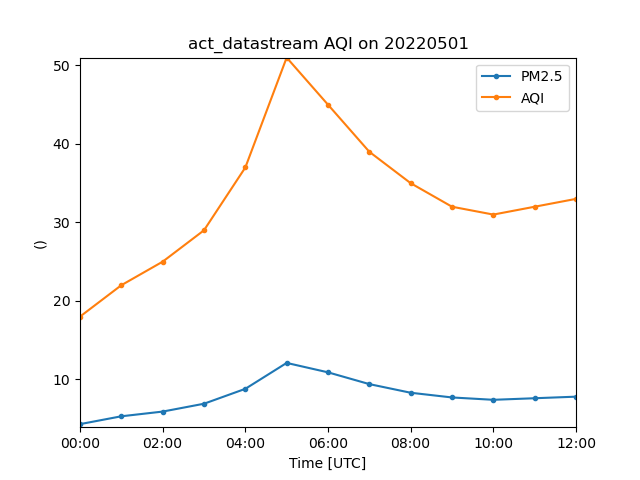
    # Plot the available PM2.5 concentration and AQI data.
    display = act.plotting.TimeSeriesDisplay(results)
    display.plot('PM2.5', label='PM2.5')
    display.plot('AQI', label='AQI')

    plt.legend()
    plt.show()
Total running time of the script: (0 minutes 1.532 seconds)